Instant payouts with SIDES Pay
What With instant payout, you can transfer your available SIDES Pay balance immediately to your registered bank account as needed, instead of waiting for the regular payout. Where Admin: SIDES Pay > Instant payouts. |
Requirements
To use instant payout, the following requirements apply:
- Use the new navigation.
- SIDES Pay is active for your account.
- Your account is enabled for instant payouts. If this is not the case, you will see a message in the administration (see section "Instant payout not available").
- If you have multiple locations, use the store selection to choose the location for which you want to make the payout.
Open instant payout
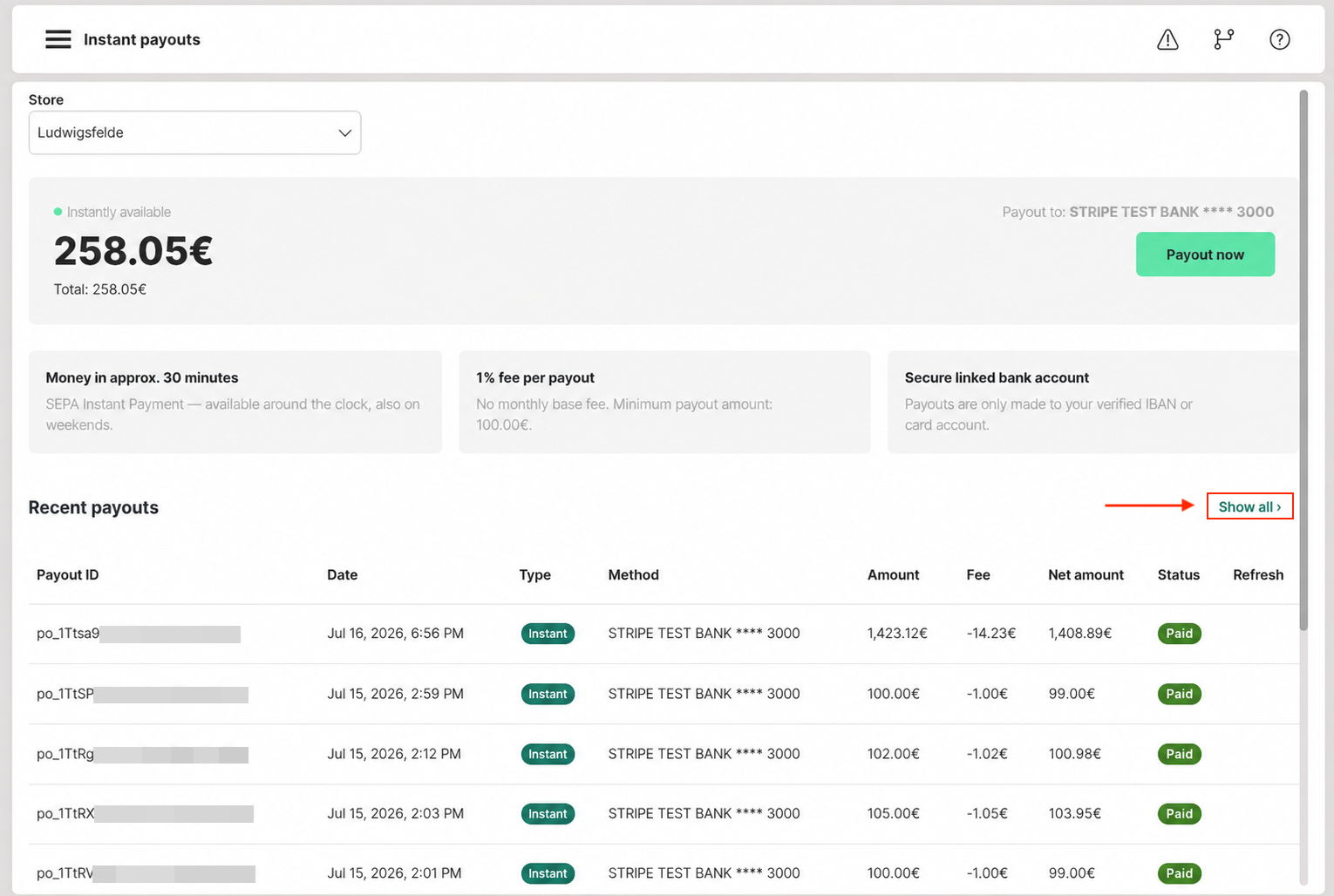
You can find the payout section under Admin: SIDES Pay > Instant payouts.
Perform instant payout
- Open the payout section under Admin: SIDES Pay > Instant payouts. You will see your current available balance. The payout is limited to EUR 200,000 per calendar day.
- If you have multiple locations, select the store for the payout at the top of the page.
- Click "Payout now".
- Enter the desired payout amount. Partial amounts are possible, with a minimum amount of 100 euros. The amount must not exceed your available balance.
- Review the displayed fee and the resulting net payout amount.
- Confirm the payout with the "Payout now" button.
- Track the payout status in the payout journal.
Fees
A fee applies to instant payouts (Stripe, approximately 1 percent). The exact fee amount and the net amount that will reach your account are always displayed before confirmation. Only confirm the payout after you have reviewed both amounts.
Payout duration
An instant payout typically reaches your account within a few minutes. In rare cases, it may take a little longer. You can always check the current status in the payout journal.
Payout to registered bank account
The payout always goes to your registered IBAN reference account from the SIDES Pay setup. You do not need to enter or can enter account details or cards during the payout.
Payout journal
In the payout journal, you can see the following information for each payout:
- Type: The type of payout.
- Method: The target account as IBAN with the last four digits.
- Fee: The fee charged for the payout.
- Net amount: The amount that reaches your account after the fee is deducted.
- Status: The current status of the payout, displayed as a status indicator.
Under "Show all" the complete payout list is displayed. There you can also search for a payout ID or filter by date.
Failed instant payouts
If a payout fails, you will receive a clear error message and the status in the journal will be set to "failed". No automatic replacement payout via SEPA will be triggered. You can then trigger the payout again. If the problem persists, contact SIDES support.
Instant payout not available
If your account is not yet enabled for instant payouts, you will see a message in the payout section that explains this status. An instant payout cannot be triggered in this case. Your regular payouts will continue unaffected.
Frequently asked questions
- Is there a minimum amount?
Yes, the minimum amount is 100 euros. Partial amounts of your available balance are possible from this amount. - I have multiple locations. How do I payout for a specific location?
Use the store selection in the payout section to select the desired location. - Can I payout to a card?
No. The payout goes exclusively to your registered IBAN reference account.